
UX design is not about making things look pretty. That is a persistent and damaging misconception. UX design is about making things work well for the people who use them. It is a discipline grounded in research, tested through iteration, and measured by outcomes. At Pepla, our design team -- available through team augmentation -- works alongside developers from the earliest stages of every project, and understanding what they actually do -- and why -- helps everyone involved deliver better software.
The Research-Wireframe-Prototype-Test Cycle
Good UX design follows a cycle, not a straight line. The cycle begins with research, moves through ideation and design, and returns to research through testing. Each pass through the cycle increases confidence that the design solves real problems for real users.

Research
Before a single pixel is placed, UX designers need to understand who they are designing for and what problems those people face. User research takes many forms. User interviews are one-on-one conversations with representative users, structured around their goals, frustrations, and current workflows. Five well-conducted interviews can reveal 85% of usability issues in a given domain.
Contextual inquiry goes a step further -- observing users in their actual environment, doing their actual work. This reveals behaviours that users cannot or will not articulate in interviews. People adapt to bad tools in ways they no longer notice, and observation uncovers those adaptations.
Competitive analysis examines how existing products solve similar problems. Not to copy, but to understand established patterns users already know, and to identify opportunities where competitors fall short. Analytics review examines quantitative data from existing systems -- where users drop off, which features are used most, where errors cluster.
The output of research is typically user personas (archetypal users with specific goals and constraints), journey maps (step-by-step visualisations of how users accomplish tasks), and a prioritised list of problems to solve.
Wireframes
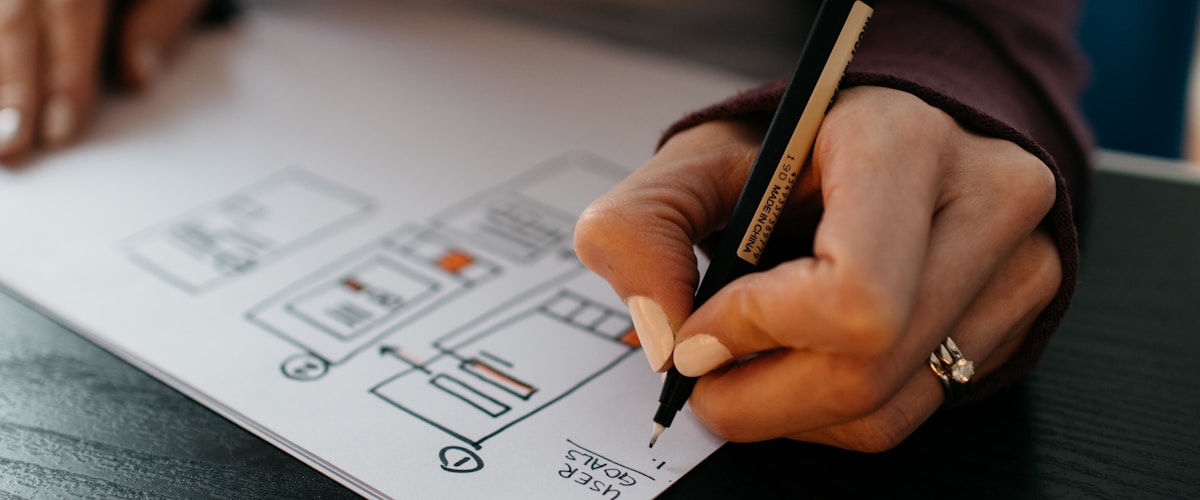
Wireframes are low-fidelity representations of the interface structure. They define what appears on each screen, how elements are arranged, and how users navigate between screens. They deliberately omit visual design details -- colour, typography, imagery -- to keep the focus on information architecture and interaction flow.
The value of wireframes is speed. A wireframe takes minutes to create and modify. A fully designed screen takes hours. By exploring multiple layout approaches at the wireframe level, designers can evaluate alternatives quickly without investing in visual polish that might be discarded.
At Pepla, we often create wireframes collaboratively with developers and business analysts. This ensures that the proposed structure is technically feasible and aligned with business requirements before visual design begins. It also gives developers early visibility into what they will be building, which improves sprint planning.
UX is not about making things pretty. It is about understanding how people think, behave, and make decisions -- then designing for that reality.
Prototypes
A prototype is an interactive representation of the design that users can click through as if it were a real application. Prototypes range from low-fidelity (clickable wireframes) to high-fidelity (pixel-perfect designs with realistic data and transitions). The appropriate fidelity depends on what you are testing.
Low-fidelity prototypes are ideal for testing navigation structure and task flows early in the process. Can users find the settings page? Do they understand the checkout process? High-fidelity prototypes are used later to test specific interactions, validate visual hierarchy, and conduct stakeholder reviews.
The critical insight about prototypes is that they are disposable. A prototype's job is to generate learning, not to become the final product. Designers who become attached to their prototypes resist the feedback that makes the final product better.
Testing
Usability testing puts the prototype in front of real users and observes how they interact with it. The designer gives participants specific tasks -- "Find and update your billing address" or "Generate a monthly sales report" -- and watches what happens. Where do they hesitate? What do they click on that is not clickable? Where do they give up?
Testing consistently reveals surprises. Features the team considered intuitive confuse users. Workflows the team considered secondary turn out to be primary. Labels the team considered clear are ambiguous. Each round of testing generates insights that feed back into the next design iteration.
Tools of the Trade
Figma has become the dominant design tool for good reason. It is browser-based, enabling real-time collaboration between designers, developers, and stakeholders. It supports everything from rough wireframes to production-ready designs, and its component system maps naturally to front-end component libraries. Developers can inspect Figma designs to extract exact colours, spacing, typography, and assets -- reducing the "design-to-code" translation errors that plague projects without a shared design tool.
Maze is a remote usability testing platform that integrates directly with Figma prototypes. Designers publish a prototype to Maze, define tasks, and send it to participants. Maze collects quantitative data -- task completion rates, time on task, misclick rates -- alongside qualitative feedback. This makes testing scalable and repeatable without requiring in-person sessions.
Hotjar operates on live products rather than prototypes. It captures heatmaps (where users click, scroll, and move their cursor), session recordings (individual user journeys through the application), and feedback widgets (contextual surveys that appear at specific points in the user flow). Hotjar data reveals how the shipped product is actually being used, which feeds back into future design iterations.
Other tools in the designer's toolkit include Miro for collaborative workshops and journey mapping, Optimal Workshop for card sorting and tree testing, and Storybook for documenting and previewing UI components in isolation.
Prototypes are disposable -- their job is to generate learning, not to become the final product. Let go of attachment to iterate faster.
Collaboration with Developers
The handoff between design and development is where many projects lose fidelity. A beautiful design that developers cannot implement accurately is a failure of collaboration, not a failure of development skill.
Effective collaboration starts early. Designers who involve developers during the wireframe stage avoid proposing interactions that are technically expensive or impractical. Developers who participate in design reviews understand the reasoning behind layout decisions, which helps them make good judgement calls during implementation when edge cases arise that the design did not anticipate.
The best design-development relationships are not handoffs. They are ongoing conversations. The design evolves as implementation reveals constraints, and the implementation improves as designers clarify intent.
At Pepla, our designers and developers work in the same sprint cadence. Designers work one sprint ahead, preparing designs for upcoming stories. They attend sprint planning to answer questions about upcoming designs and sprint review to evaluate implemented designs against the original intent. This tight feedback loop catches misinterpretations early and reduces rework significantly.
Design Systems Ownership
A design system is a collection of reusable components, patterns, and guidelines that ensure visual and interaction consistency across a product. It includes a component library (buttons, forms, cards, modals), a style guide (colour palette, typography scale, spacing system), and usage guidelines (when to use a modal vs a drawer, how to handle empty states, loading patterns).
The UX designer typically owns the design system. They create and maintain the Figma component library, document usage patterns, and ensure new designs use existing components rather than inventing new ones without justification. This ownership extends to governance -- reviewing proposed additions to the system, deprecating outdated components, and communicating changes to the development team.
A well-maintained design system accelerates both design and development. Designers compose new screens from existing components rather than designing from scratch. Developers implement against a known library of UI components rather than interpreting each screen independently. Consistency improves, and the time from design to implementation shrinks.
A design system is not a library of components -- it is a shared language that accelerates both designers and developers simultaneously.
Measuring Design Success
Design decisions should be measured, not just felt. Usability metrics provide objective evidence of whether a design is working.
Task completion rate measures whether users can accomplish specific goals. If only 60% of users can successfully complete a purchase, the checkout flow has a design problem. Time on task measures efficiency -- can users accomplish their goal quickly? Error rate tracks how often users make mistakes, such as submitting invalid forms or navigating to the wrong section. System Usability Scale (SUS) is a standardised 10-question survey that produces a score between 0 and 100, allowing comparison across products and over time. A score above 68 is considered above average.
Net Promoter Score (NPS) measures user satisfaction and loyalty. While not a usability metric per se, it correlates strongly with overall experience quality. Customer Effort Score (CES) asks users how easy it was to accomplish their goal, providing a direct measure of friction in the experience.
At Pepla, we establish baseline metrics before a redesign and measure again after launch. This provides concrete evidence of improvement and justifies continued investment in design quality.
Career Progression
UX design offers multiple career trajectories. The individual contributor path progresses from Junior UX Designer through Mid-level and Senior UX Designer to Principal or Staff Designer. Each level involves increasing scope (from features to products to product suites), increasing autonomy, and increasing influence on design strategy.
The management path moves from Senior Designer to Design Lead, Design Manager, and eventually Head of Design or VP of Design. These roles shift focus from hands-on design to team building, process improvement, hiring, and design culture.
The specialist path allows designers to go deep in a specific area: UX Research, Interaction Design, Information Architecture, or Design Systems. Specialists develop expertise that generalists cannot match, and they are invaluable on complex projects within their domain.
Establish baseline usability metrics before a redesign and measure again after launch. Concrete evidence justifies continued investment in design quality.
Regardless of the path chosen, the most successful UX designers share a common trait: genuine curiosity about how people think, behave, and make decisions. The tools and techniques evolve, but the fundamental discipline of understanding users and designing for their needs remains constant.